🎮 Configuration and basic session replay controls
To follow this tutorial, set disable_session_recording: true in PostHog initialization. (Next.js example below.)
JavaScript
// pages/_app.js
import posthog from "posthog-js"
import { PostHogProvider } from 'posthog-js/react'
if (typeof window !== 'undefined') {
  posthog.init('phc_HVcGJdGDtkcvV1qUuz5bDrMf987gskGUpFH1nV6ufov', {
    api_host: 'https://us.i.posthog.com',
    defaults: '2025-05-24',
    disable_session_recording: true,
  })
}
export default function App({ Component, pageProps }) {
  return (
    <>
      <PostHogProvider client={posthog}>
        <Component {...pageProps} />
      </PostHogProvider>
    </>
  )
}
Use startSessionRecording() to trigger replay when you want.
💡 Example: start replay only outside development via the loaded callback:
JavaScript
//...
if (typeof window !== 'undefined') {
  posthog.init('phc_HVcGJdGDtkcvV1qUuz5bDrMf987gskGUpFH1nV6ufov', {
    api_host: 'https://us.i.posthog.com',
    defaults: '2025-05-24',
    disable_session_recording: true,
    loaded: (posthog) => {
      if (process.env.NODE_ENV != 'development') posthog.startSessionRecording()
    }
  })
}
//...
⛳️ Control recordings with feature flags
Use feature flags to control which sessions get recorded.
🎯 Filter by:
- People properties
- Group properties
- Cohorts
- Percentages of any of the above
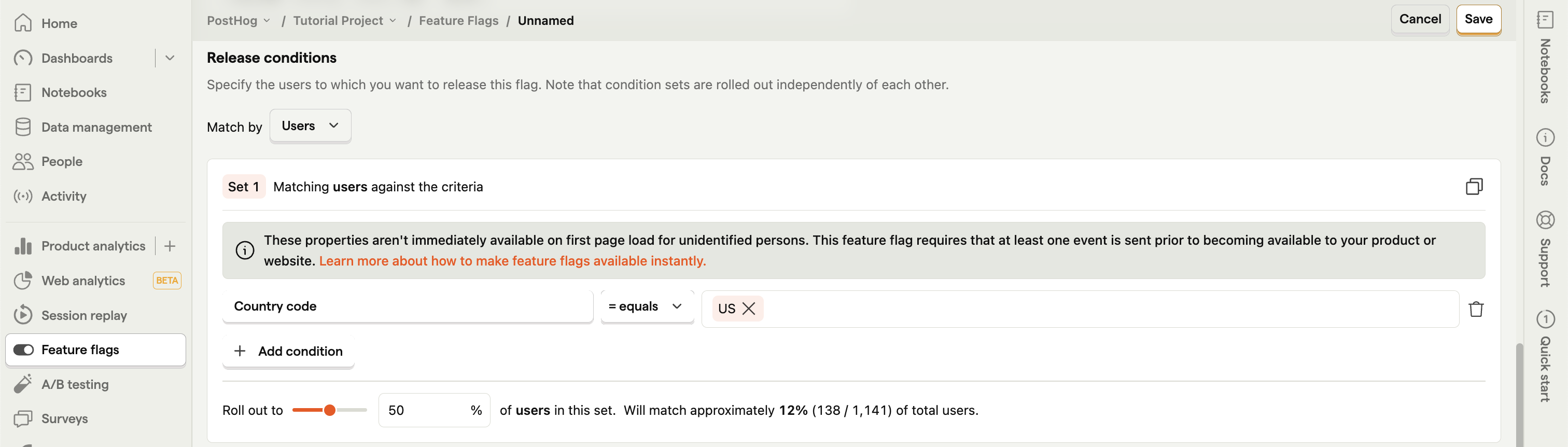
💡 Example: record 50% of US sessions → flag where country = US, rolled out to 50%.
📬 Using linked feature flags
Enable this flag in your replay ingestion settings.
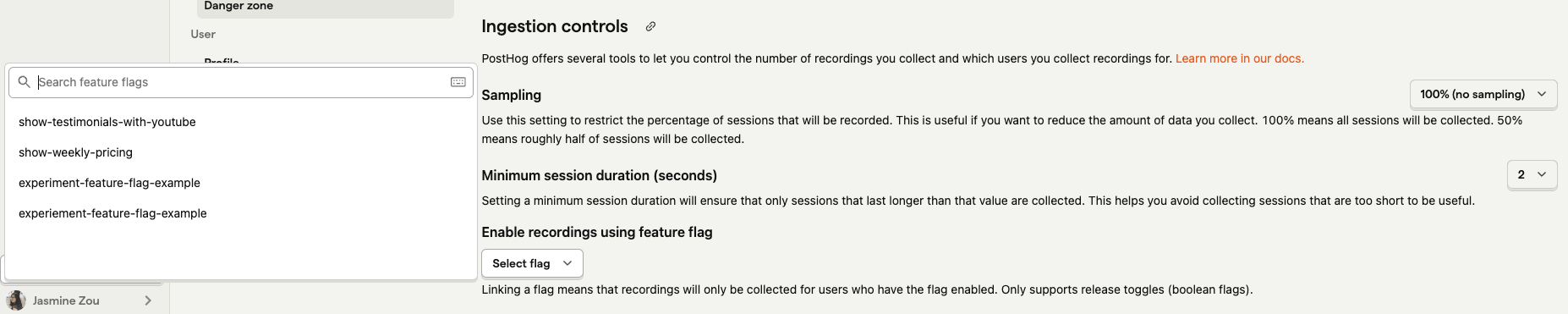
Recordings buffer locally until the decide response arrives.
- ✅ Flag on → recording continues
- ❌ Flag off → recording stops; no data leaves the client
💻 Manually in your code
Alternatively, check the flag after PostHog init and start a recording if it’s on.
🪝 Use the usePostHog + useFeatureFlagEnabled hooks from posthog-js/react:
JavaScript
import { useFeatureFlagEnabled, usePostHog } from 'posthog-js/react'
export default function Home() {
  const posthog = usePostHog()

  if (useFeatureFlagEnabled('record-na')) {
    posthog.startSessionRecording()
  }
  return (
    <>
      <p>Record this page</p>
    </>
  )
}
🤔 Evaluating the flag on load
Want to evaluate flags as soon as PostHog loads?
- Use the
loadedmethod in init options
- Wrap with
onFeatureFlagsto ensure flags are ready
JavaScript
// pages/_app.js
if (typeof window !== 'undefined') {
  posthog.init('phc_HVcGJdGDtkcvV1qUuz5bDrMf987gskGUpFH1nV6ufov', {
    api_host: 'https://us.i.posthog.com',
    defaults: '2025-05-24',
    disable_session_recording: true,
    loaded: (posthog) => {
      posthog.onFeatureFlags((flags) => {
        if (posthog.isFeatureEnabled('record-na')) posthog.startSessionRecording()
      })
    }
  })
}
//...
⚠️ Note: For new users, person properties aren’t available until ingestion → flags depending on them won’t evaluate correctly inside
loaded.
✅ GeoIP props (continent, country, city) → work (no ingestion needed)
🔧 For person-property flags → use bootstrapping
🔎 Record on specific pages
Trigger recordings per page by calling startSessionRecording() on page load. Or use the router to start replays only on specific routes.
JavaScript
import { useEffect } from "react"
import { usePostHog } from "posthog-js/react"
export default function About() {
  const posthog = usePostHog()
  useEffect(() => {
    posthog.startSessionRecording()
  }, []);
  return (
    <>
      <p>Record this page</p>
    </>
  )
}
⚠️ Note: routers like
next/routerdon’t fire on initial page load — only on subsequent in-app navigations. Direct hits to the page won’t trigger.
♟️ Record after specific user behavior
Trigger recordings on any user action — clicks, inputs, hovers, scrolls.
Just call startSessionRecording() when the action fires.
JavaScript
import { usePostHog } from 'posthog-js/react'
export default function Home() {
  const posthog = usePostHog()
  return (
    <>
      <p>Record this page</p>
      <button onClick={() => posthog.startSessionRecording()}>
        Start recording
      </button>
    </>
  )
}
🎯 Useful for:
- Signup/checkout funnels
- New or updated features
- Specific components within larger ones