🧐 Why do I need Atlas for my proactive visual copilot?
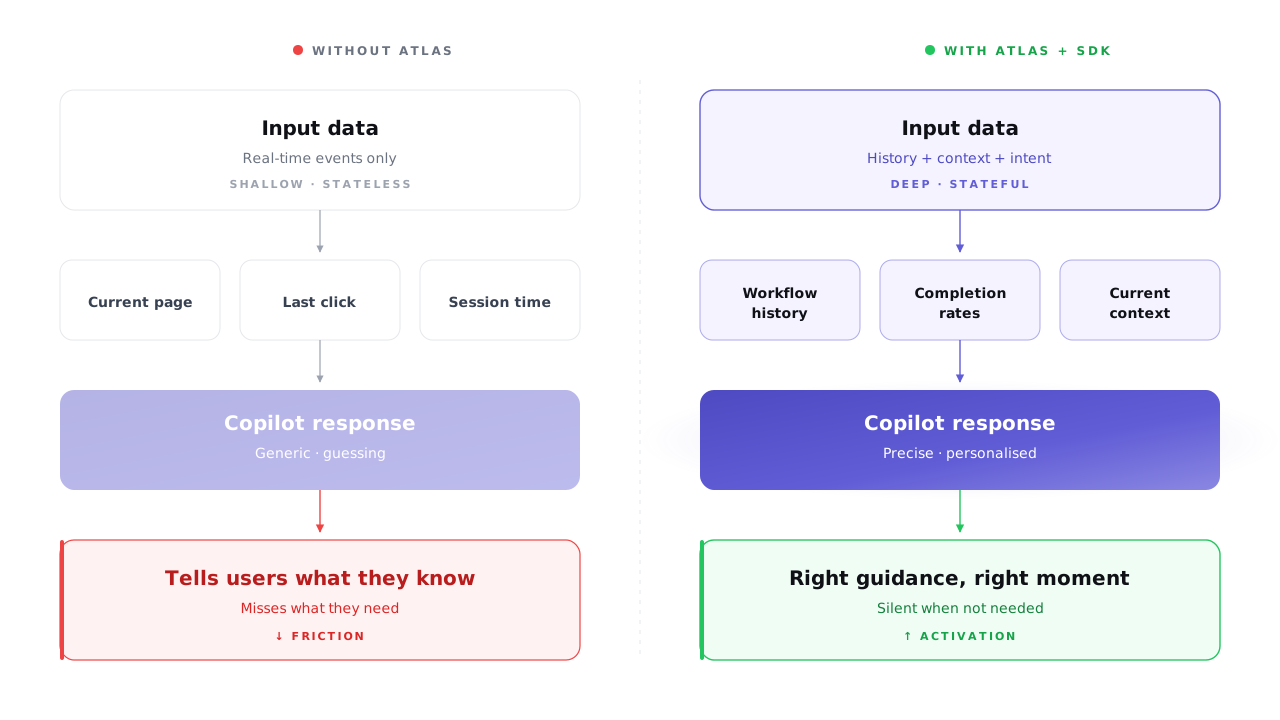
🎯 Your copilot is only as good as the data behind it.
At every moment, it needs to know:
- What each user has done
- What they haven’t
- Where they’ll need guidance next
🗺️ Atlas is that foundation:
- Labels every session by workflow + completion rate
- Real-time signal → intent understood
- Avoids telling users what they already know
- Surfaces workflows they haven’t found yet
⚡ Why aren’t events alone enough?
- Events show what’s happening right now
- Without history → copilot suggests stuff users already mastered
- Atlas gives the full picture: now plus everything before
📍 Your copilot also needs to know where the user is in the product.
That’s the Autoplay SDK → pulls contextual user memory by location → right moment, right guidance.
Atlas + SDK:
- ❌ Without both → copilot is guessing
- ✅ With both → every interaction is grounded in who the user is & what they’ve done
📈 Measure your copilot over time:
- Track workflow completion rates
- Higher rates on key workflows = your copilot is working
🏆 The goal: move every user closer to the golden path — the sequence that defines a fully activated, high-value user.